
Outdoor architectural lighting, facades
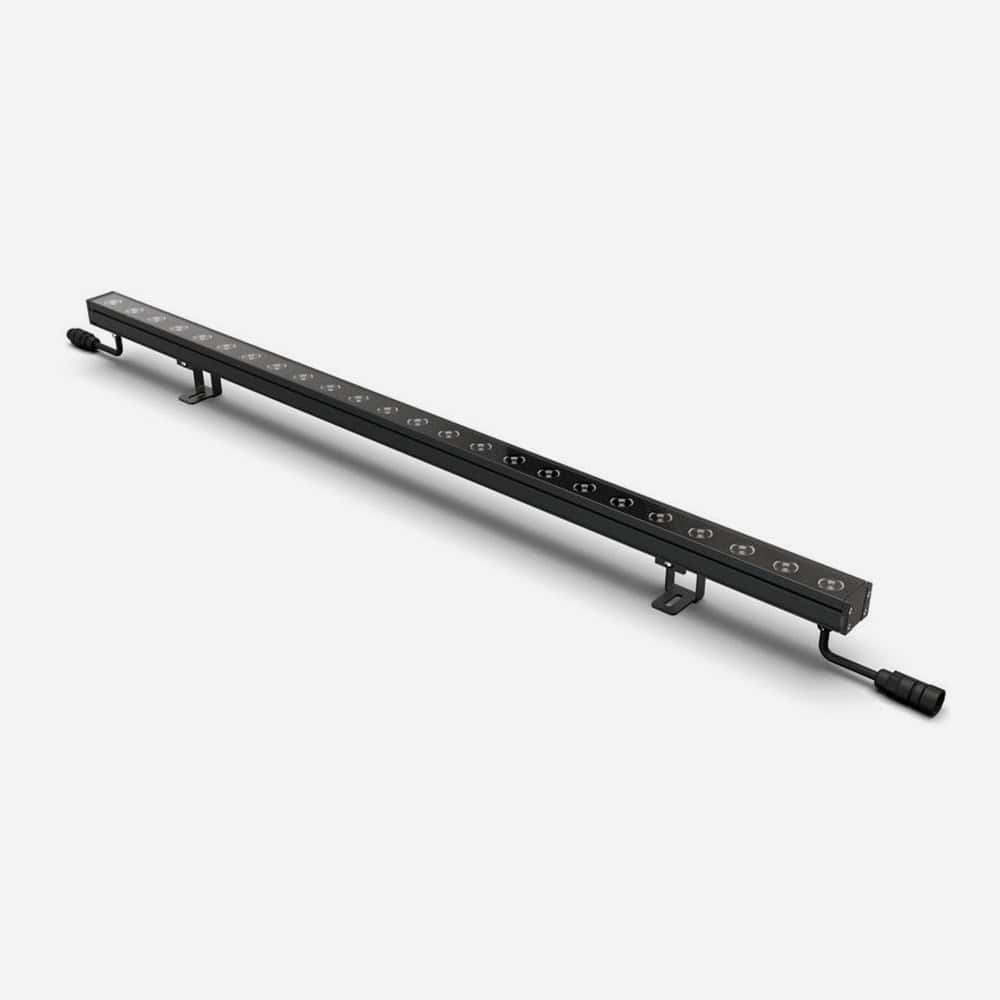 Linear Fixtures 5-pin connection
Linear Fixtures · 24V DC
RGBW LED Wall Washer
WW-RGBW-36W-24V-1218MM, WW-RGBW-36W-24V-1002MM, WW-RGBW-18W-24V-615MM, WW-RGBW-18W-24V-507MM, WW-RGBW-9W-24V-314MM
Multi-layer waterproof build, high brightness, intelligent control with dynamic effects, multi-angle bracket, corrosion-resistant aluminum heat sink.
Power9 W · 18 W · 36 W
Light output1218 mm: RGBW 1,620 lm · RGB 1,260 lm · White 4…
ColourRGBW · 3000K white
IP ratingIP66 · IK06
Input24 V DC
Warranty3 years
Length
Your Part NumberWW-RGBW-36W-24V-1218MM, WW-RGBW-36W-24V-1002MM, WW-RGBW-18W-24V-615MM, WW-RGBW-18W-24V-507MM, WW-RGBW-9W-24V-314MM
Special Request: Other white colour temperatures for the W channel and other optic beam angles, please inquire (3000K white and the 15×45° optic are standard). Ask Us

Specifications
Input voltage
24 V DC (AC models not offered at this time)
Connection
5-pin
Power
9 W (314 mm) · 18 W (507 / 615 mm) · 36 W (1002 / 1218 mm)
Light output
1218 mm: RGBW 1,620 lm · RGB 1,260 lm · White 4,680 lm | 1002 mm: RGBW 1,315 lm | 615 mm: 810 / 630 / 2,340 lm | 314 mm: 405 / 315 / 1,080 lm | 507 mm: to be confirmed
Colour
RGBW · 3000K white (standard)
Beam / optics
15×45° (standard)
Special request
Other white colour temperatures for the W channel and other optic beam angles, please inquire (3000K white and the 15×45° optic are standard)
Size
Lengths 1218, 1002, 615, 507, 314 mm · weights 1.7 / 1.5 / 1.0 / 0.7 kg (507 mm to be confirmed)
IP rating
IP66 · IK06
Certifications
Lifetime
50,000 h
Warranty
3 years
Operating temp.
-20 °C to +40 °C
Control / options
DMX/RDM; DMX via STICK-DE3 or LUNA 8 / Madrix
Accessories
Order separately: WW-RGBW-INP-CBL input cable 3 m · WW-RGBW-T-CBL T-cable 0.5 m · WW-RGBW-BRK-CBL link cable 0.3 m · WW-RGBW-EC end cap · WW-RGBW-ARM-BRK arm bracket 46 cm (2 per 1218 mm fixture) · DMXHCD DMX address writer
Specifications from the DayTech LED cut sheet. Subject to change without notice.
| Part Number | Voltage | IP Rating | Colour | Length / Size | Power | Quote |
|---|---|---|---|---|---|---|
| WW-RGBW-36W-24V-1218MM | 24 V DC | IP66 | RGBW | 1218 mm | 36 W | |
| WW-RGBW-36W-24V-1002MM | 24 V DC | IP66 | RGBW | 1002 mm | 36 W | |
| WW-RGBW-18W-24V-615MM | 24 V DC | IP66 | RGBW | 615 mm | 18 W | |
| WW-RGBW-18W-24V-507MM | 24 V DC | IP66 | RGBW | 507 mm | 18 W | |
| WW-RGBW-9W-24V-314MM | 24 V DC | IP66 | RGBW | 314 mm | 9 W |
Wiring to a Nicolaudie STICK-DE3 DMX Controller
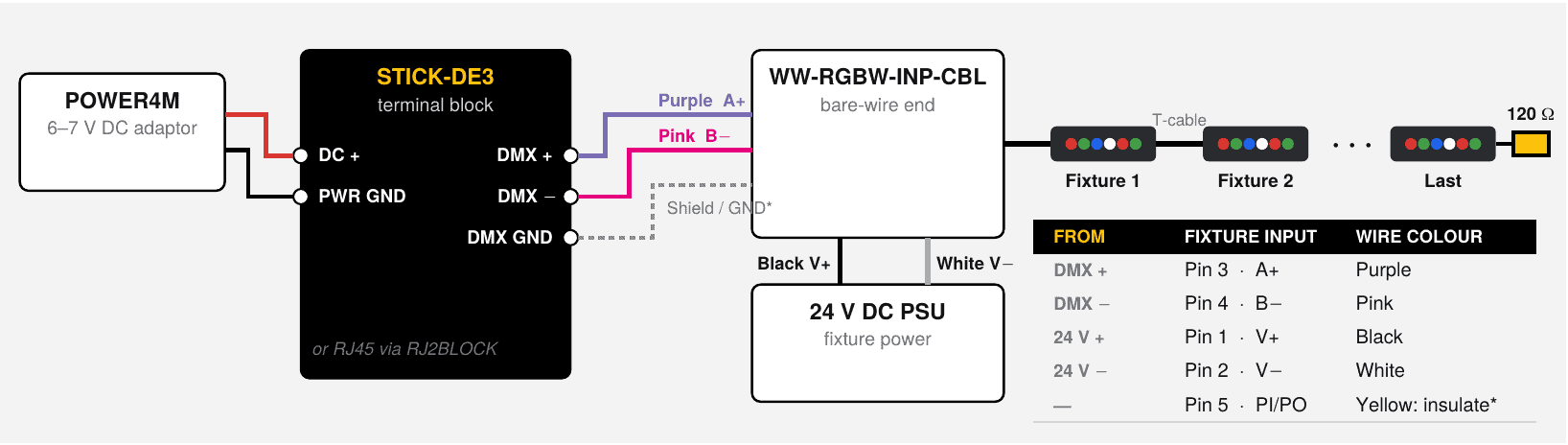
The STICK-DE3 touch wall controller drives the 24 V DC native-DMX RGBW LED Wall Washer directly. Its DMX+ / DMX− outputs connect straight to the fixture's A+ / B− signal pair, so no decoder or converter is needed. Program colours, scenes and effects with the free Generic RGBW profile.
What You Need
- STICK-DE3 touch wall controller (black or white glass), 146 × 106 × 11 mm, fits a single or double gang box
- POWER4M 7 V adaptor for the controller (the STICK-DE3 takes 5–15 V DC), kept separate from the fixture supply
- 24 V DC power supply for the wall washers
- WW-RGBW-INP-CBL input cable (3 m, 5-pin female connector to bare wire) to the first fixture
- WW-RGBW-T-CBL T-cables and WW-RGBW-BRK-CBL link cables (0.3 m) to join fixtures
- WW-RGBW-EC waterproof end cap and a 120 Ω resistor for the last fixture
- DMXHCD DMX address writer, to set each fixture's start address
- Shielded twisted-pair DMX cable
- Optional: RJ2BLOCK adapter to wire power + DMX through the controller's RJ45 socket instead of the screw terminals
Connections
| From | Fixture Input (WW-RGBW-INP-CBL) | Wire Colour |
|---|---|---|
| STICK-DE3 DMX+ | Pin 3 · A+ | Purple |
| STICK-DE3 DMX− | Pin 4 · B− | Pink |
| 24 V DC supply V+ | Pin 1 · V+ | Black |
| 24 V DC supply V− | Pin 2 · V− | White |
| Not used | Pin 5 · PI/PO | Yellow: insulate |
- STICK-DE3 DMX GND: connect to the DMX cable shield. Tie it to 24 V V− only if a reference is required.
- POWER4M adaptor: to the STICK-DE3 DC+ and PWR GND terminals. Don't reverse + and ground.
Installation in 5 Steps
- 1Mount and Power the Controller
Fit the STICK-DE3 in a single or double gang box (a double box leaves room for the power supply). Power it from its own POWER4M adaptor. Never connect it to the 24 V fixture supply. Don't turn the power on until the controller is securely mounted.
- 2Run the DMX Signal
Connect the STICK-DE3 DMX+ to the purple (A+) wire and DMX− to the pink (B−) wire on the WW-RGBW-INP-CBL. Use shielded twisted-pair DMX cable.
- 3Power the Fixtures
Connect the 24 V DC supply V+ to the black wire and V− to the white wire. Daisy-chain the fixtures with T-cables and link cables, and twist each connector fully closed.
- 4Address and Terminate
Set each fixture's DMX start address with the DMXHCD writer. Fit a 120 Ω resistor across A+ / B− at the last fixture, and seal the end with a WW-RGBW-EC end cap.
- 5Program and Play
Write scenes with ESA Pro 2 or ESA2 (PC / Mac) using the Generic RGBW profile in the "Generic" folder, then control from the wall or the iOS / Android apps. On the wall controller, tap the colour mode button a second time to mix in the white channel.
How Many Fixtures per Controller
| Fixture | DMX Channels Each | 1 Universe | 2 Universes |
|---|---|---|---|
| WW-RGBW-36W · 1218 / 1002 mm | 16 | 32 | 64 |
| WW-RGBW-18W · 615 mm | 8 | 64 | 128 |
| WW-RGBW-9W · 314 mm | 4 | 128 | 256 |
These are the maximums by DMX channels. Universe 2 is on the RJ45 / extension socket, for runs beyond 512 channels. Power limits per run still apply:
| Fixture | Max. Fixtures per 24 V DC Power Run |
|---|---|
| WW-RGBW-36W · 1218 / 1002 mm | 3 |
| WW-RGBW-18W · 615 mm | 6 |
| WW-RGBW-9W · 314 mm | 13 |
Before You Power Up
Important: Check the pin configuration. Applying power to the DMX output will damage the controller.
- Twist each fixture connector fully closed to prevent water ingress and fixture failure.
- Don't mount the STICK-DE3 against a metal wall or surface; it can affect the touch buttons.
- Don't mount the controller with too much force behind it, as this can push the glass apart.
- Don't connect power while a fixture is still in its packaging, and don't cover the fixtures while they're operating.
From the DayTech LED cut sheet and the controller manufacturer's datasheet. Mains wiring to the power supply must be done by a qualified electrician to local code.
Accessories
Compatible Accessories
More Linear Fixtures
Planning a Project with the RGBW LED Wall Washer?
Tell us the lengths and layout and we'll quote the tape, channel, connectors and driver for each run.